An APA title page is the first page of any academic paper written in APA format. It gives readers and instructors an immediate overview of the paper: who wrote it, for which course, and under which institution.

The APA 7th edition (published in 2019) introduced significant changes to title page requirements. The most important one is the distinction between two separate formats: the student title page and the professional title page. Knowing which one applies to your situation is the first step to getting it right.

Whether you are submitting a university assignment or preparing a manuscript for publication, a correctly formatted APA title page is not optional. It signals academic rigour and ensures your work meets institutional and editorial standards.

This guide covers everything you need to know: required elements, formatting rules, examples, and the most common mistakes to avoid.


Table of contents

  1. What is an APA title page?
  2. APA title page requirements
  3. APA title page checklist
  4. Student vs professional APA title page
  5. APA title page format
  6. APA title page example
  7. Running head on APA title page
  8. Common mistakes on APA title page


1. What is an APA title page?

An APA title page is the cover page of an academic paper written in APA style. It is the very first page your instructor or reviewer sees, before reading a single word of your actual work.

Its purpose is straightforward: identify the paper, its author, and its academic context at a glance.

The American Psychological Association defines precise rules for what must appear on this page and how it should be formatted. These rules are part of the broader APA Publication Manual, currently in its 7th edition (2019).


Why does it matter?

A missing element or a formatting error on your title page can affect your grade, even if the rest of your paper is excellent. Many institutions treat it as a direct indicator of attention to detail and academic seriousness.

It is also the first signal you send about the overall quality of your work. First impressions count, even in academia.


APA 6th vs APA 7th edition

The APA 7th edition introduced one major structural change: it now distinguishes between a student title page and a professional title page. Each has its own specific requirements. The 6th edition had only one format for both.

If you are a student, always default to the student version unless your instructor specifies otherwise.


2. APA title page requirements

Every title page in APA format must include a specific set of elements. Miss one, and your formatting is incomplete. The exact list depends on whether you are writing a student paper or a professional paper (more on that in the next section).

Here are the elements required for a student paper cover page in 7th edition.

student writing a paper in apa format

Paper title

Your title should be concise, clear and informative. The current APA guidelines recommend a maximum of 12 words. Avoid filler phrases like "A study of..." or "An analysis of...". Get straight to the point.

The title is bolded, centered, and placed in the upper half of the page.


Author name

Write your full name in the following format: First name, Middle initial(s), Last name. No titles (Dr., Prof.) and no credentials (PhD, MA) on a student paper.

If there are multiple authors, list them on the same line separated by commas. For three or more authors, use a comma before "and" before the last name.

student formatting an apa paper

Affiliation

Your affiliation is the name of your university or institution, followed by the specific department if required. It appears on the line directly below the author name.
Example: Department of Psychology, University of Edinburgh


Course information

Include the course number and course name as they appear in your institution's official materials.
Example: PSYC 2201: Introduction to Cognitive Psychology

Instructor name

Write your instructor's name exactly as they prefer to be addressed. When in doubt, use their full name with their title.
Example: Professor Sarah Mitchell


Assignment due date

Write the due date in the following format: Month DD, YYYY.
Example: March 15, 2025


Page number

The page number 1 appears in the top right corner of the title page header. It is part of the automatic page numbering that runs throughout the entire paper.


apa cover page checklist

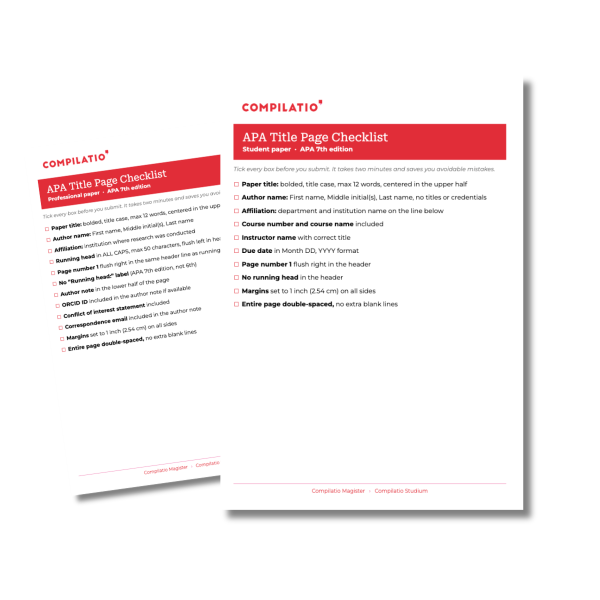
3. APA Title Page Checklist: tick every box before you submit

Most formatting errors on a title page are not caused by ignorance. They are caused by rushing. A missing bold, a wrong date format, a running head that should not be there: small details that cost points on work you spent hours on.

Use this checklist before every submission. It takes two minutes. It saves you from avoidable mistakes.


4. Student vs professional APA title page

The APA 7th edition introduced a clear distinction between two title page formats. Using the wrong one is one of the most common formatting mistakes students make.

The rule is simple: if you are submitting academic work as a student, use the student title page. If you are submitting a manuscript for publication or writing as a researcher, use the professional title page.

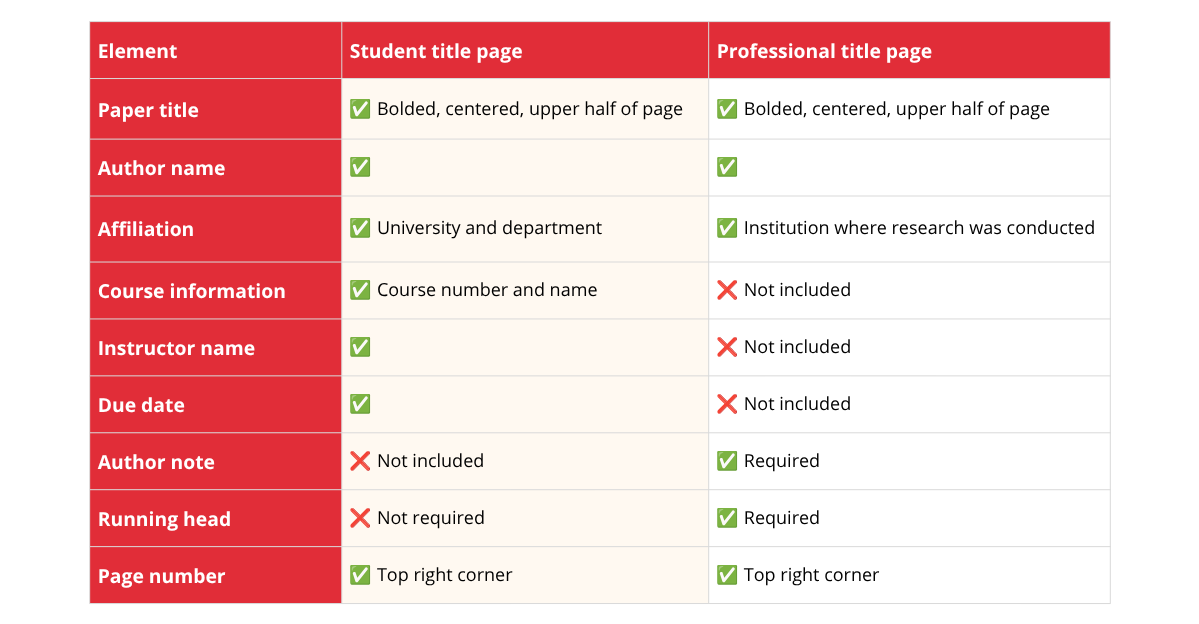
Here is a full comparison of the two formats.

apa student vs professional title page format comparison


The student title page includes paper title, author name, affiliation, course information, instructor name, due date, and page number. The professional title page includes paper title, author name, affiliation, author note, running head, and page number. Course details are exclusive to the student format. The author note and running head are exclusive to the professional format


What is an author note?

The author note appears only on professional title pages. It provides additional information about the author: ORCID ID, any changes in affiliation, acknowledgements, and contact information for correspondence.
Students do not need an author note unless their instructor explicitly requests one.


What about the running head?

The running head is an abbreviated version of your paper title that appears in the header of every page. Under the latest APA standard, it is only required for professional papers submitted for publication. Students no longer need to include it, which is a significant simplification compared to the 6th edition.

We cover the running head in full detail in section 7.


5. APA title page format

Getting the content right is only half the job. The APA title page format also requires precise visual formatting. Here are all the rules you need to apply.

cover page apa formatting

Page layout

APA margins must be set to 1 inch (2.54 cm) on all sides: top, bottom, left and right. This applies to the title page and every subsequent page of your paper.


Font and font size

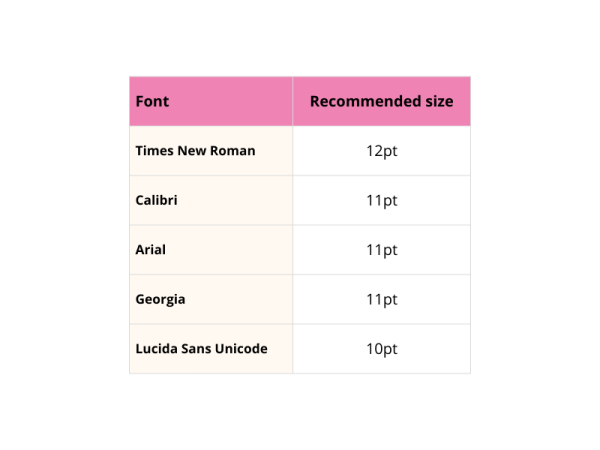
The APA 7th edition accepts several fonts. The key requirement is consistency: use the same font throughout the entire paper, including the title page.

We highly recommend you avoid decorative or informal fonts. When in doubt, Times New Roman 12pt remains the safest and most widely accepted choice.

apa title page formatting

Line spacing

The entire title page must be double-spaced. This includes the title, author name, affiliation, course information, instructor name and due date. No extra spacing between elements.


Alignment

All elements on the student title page are centered horizontally. The only exception is the page number, which sits flush right in the header.


Title formatting

Your paper title must be:

  • Bolded
  • In title case (capitalize the first word, all major words, and words of four letters or more)
  • Positioned in the upper half of the page, roughly around the middle vertically

If your title runs to two lines, keep it double-spaced and do not add any extra spacing between the two lines.


Page number placement

The page number appears in the top right corner of the header. It should be flush right, in the same font and size as the rest of the paper. No "p." or "page" before the number, just the number itself.


A note on the running head

As covered in section 4, students following APA 7th edition do not need a running head on their title page. If your instructor or institution still requires it, refer to section 7 for full formatting instructions.


student apa title page template annotated 7th edition example

6. APA title page example

The best way to make sure your cover page is correctly formatted is to see what it looks like in practice. Below are two annotated examples: one for a student paper and one for a professional paper.


Student APA title page example

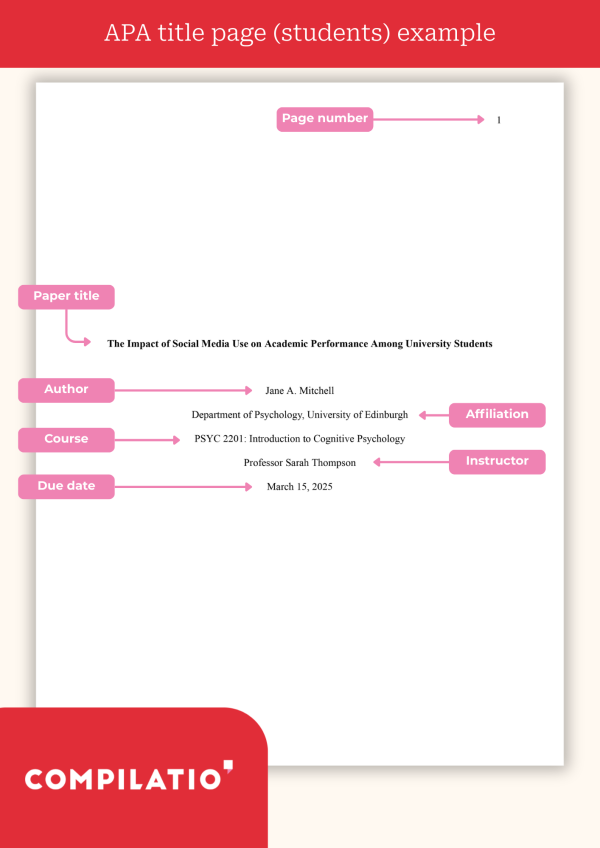
Here is what a correctly formatted student title page looks like following APA 7th edition rules.

Key formatting details to notice:

  • Page number sits in the top right corner of the header
  • Title is bolded and in title case
  • Each element appears on a separate line, all double-spaced
  • Everything is centered
  • No running head in the header


professional apa title page example with running head and author note

Professional APA title page example

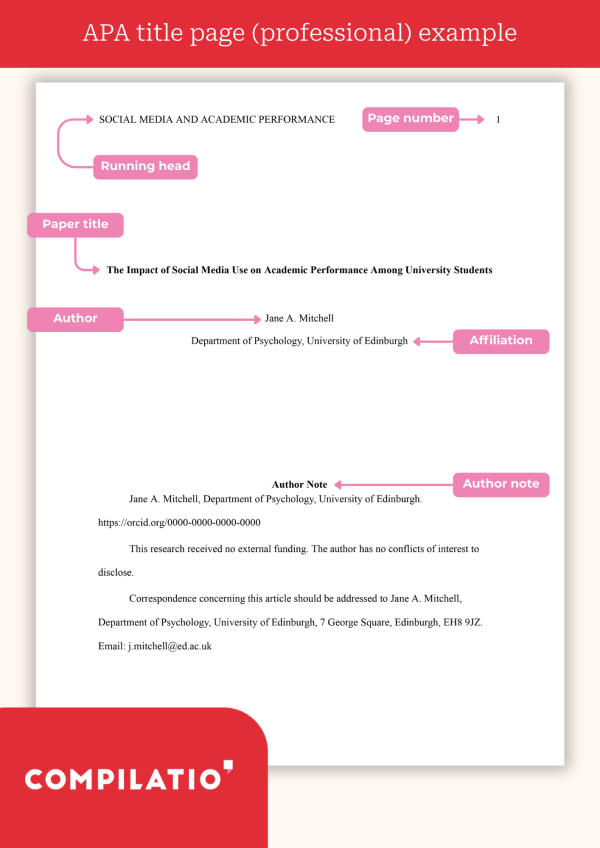
Here is what a correctly formatted professional title page looks like.

Key formatting details to notice:

  • Running head appears in the header, flush left, in all caps
  • Page number sits flush right in the same header line
  • Author note appears in the lower half of the page, left-aligned
  • Title is bolded and centered in the upper half


The most important difference at a glance

The difference between the two formats comes down to three things.

  • On the student title page, the header contains only the page number, the lower half of the page stays empty, and course details (course number, instructor name, due date) are included.
  • On the professional title page, the header combines a running head with the page number, the lower half is occupied by an author note, and course details are nowhere to be seen.

Same APA 7th edition, two very different layouts depending on who you are writing for.


7. Running head on APA title page

The running head is one of the most misunderstood elements of APA formatting. The APA 7th edition simplified the rules significantly compared to the previous edition. Here is everything you need to know.


What is a running head?

A running head is an abbreviated version of your paper title that appears in the header of every page of your document, flush left. It is designed to help readers identify the paper when pages are separated from each other, which is particularly useful in published journal articles.

running head apa definition

Do students need a running head?

No. The APA 7th edition removed the running head requirement for student papers. If you are submitting a university assignment, you do not need a running head unless your instructor explicitly asks for one.

This is one of the biggest changes introduced by the APA 7th edition compared to the 6th edition, where a running head was required for all papers.


When is a running head required?

A running head is only required for professional papers intended for publication in an academic journal.

apa running head rules for students

How to format a running head

If your paper requires a running head, follow these rules precisely.

Content

  • Write an abbreviated version of your full paper title
  • Maximum 50 characters, including spaces and punctuation
  • Written in ALL CAPS
  • Do not include the words "Running head:" before it (this was required in the 6th edition but is no longer needed in the 7th)

Placement

  • Flush left in the header
  • On the same line as the page number, which remains flush right
  • Same font and font size as the rest of the paper
  • Appears on every page of the paper, including the title page

Running head example

If your full title is:

"The Impact of Social Media on Academic Performance in University Students"

Your running head would be:


In this example, the full title "The Impact of Social Media on Academic Performance in University Students" is abbreviated to: SOCIAL MEDIA AND ACADEMIC PERFORMANCE


APA 6th vs APA 7th edition: running head comparison

The APA 6th edition required a running head for every paper, student or professional, no exceptions. The APA 7th edition changed that entirely. Student papers no longer need one. Professional papers still do. And the label itself changed too: where the 6th edition demanded "Running head: TITLE" on the title page, the 7th drops the label and keeps the abbreviated title only, in all caps, on every page including the first. A small change on paper, a significant source of confusion for anyone who learned the old rules and never updated them.


8. Common mistakes on APA title page

Even the most careful students make formatting errors on the first page of their paper. The good news: they are all avoidable. Here are the most frequent ones, and how to fix them.

choosing the right apa title page version

Mistake 1: Using the wrong title page version

Using a professional title page format when you are a student (or vice versa) is the most common error. The two formats have different required elements. Submitting a professional format with a running head and an author note when your instructor expects a student format signals immediately that you have not read the APA 7th edition guidelines carefully.

Fix: default to the student format unless explicitly told otherwise.

bolding the apa paper title

Mistake 2: Forgetting to bold the title

The paper title must be bolded on the title page. It is one of the clearest requirements in the APA 7th edition, and one of the most frequently missed. A title page without a bolded title is an instant formatting error.

Fix: bold your title, and make sure it is in title case, not all caps.

running head on a student paper

Mistake 3: Including a running head on a student paper

Many students still add a running head out of habit, often because they learned APA 6th edition rules. In the APA 7th edition, the running head is not required for student papers. Including one does not make your paper look more professional. It just shows you are working from outdated rules.

Fix: remove the running head entirely from your student paper, unless your instructor specifically requests it.

apa date format on a title page

Mistake 4: Incorrect date format

The due date on a student title page must follow one specific format: Month DD, YYYY. Writing "15/03/2025" or "15 March 2025" does not comply with APA formatting rules.

Fix: always write the date as "March 15, 2025".

choosing a consistent apa font

Mistake 5: Wrong font or font size

Using a decorative font, mixing fonts, or using the wrong point size is a surprisingly common error. APA paper format requires a consistent, readable font throughout the entire document, title page included.

Fix: pick one of the approved fonts (Times New Roman 12pt, Calibri 11pt, Arial 11pt) and stick with it from the title page to the last reference.

double spacing an apa title page

Mistake 6: Single spacing instead of double spacing

The entire title page must be double-spaced. Every element, every line. A title page with inconsistent spacing is a red flag for any instructor familiar with APA style.

Fix: set your document to double spacing before you type a single word, not after.

spacing between apa title page elements

Mistake 7: Adding extra space between elements

Double spacing does not mean adding an extra blank line between each element. Each component (title, author name, affiliation, course information, instructor, date) follows the next with standard double-spaced line breaks only. No extra gaps.

Fix: let your word processor handle spacing automatically once double spacing is set correctly.

FAQ


What is the difference between a student and a professional APA title page?

The APA 7th edition introduced two distinct title page formats. The student title page includes the course number, instructor name, and due date. It does not require a running head. The professional title page, intended for manuscript submission, requires a running head and an author note, but does not include course details. When in doubt, use the student format unless your instructor specifies otherwise.

Do I need a running head on my APA title page?

No, not if you are a student. The APA 7th edition removed the running head requirement for student papers. This is one of the most significant changes from the 6th edition, where a running head was mandatory for all papers. Running heads are now only required for professional papers submitted for publication in an academic journal.

How should the title be formatted on an APA title page?

The paper title must be bolded, written in title case, and centered in the upper half of the page. The APA 7th edition recommends a maximum of 12 words. Avoid vague filler phrases such as "A study of..." or "An analysis of..." and go straight to the point. If the title runs to two lines, keep it double-spaced with no extra spacing between the lines.

What font and margins should I use on an APA title page?

Margins must be set to 1 inch (2.54 cm) on all four sides. For fonts, the APA 7th edition accepts Times New Roman 12pt, Calibri 11pt, Arial 11pt, Georgia 11pt, or Lucida Sans Unicode 10pt. The key rule is consistency: use the same font throughout the entire paper, from the title page to the last reference. The entire title page must be double-spaced.

What is the correct date format on an APA student title page?

The due date must be written in the following format: Month DD, YYYY. For example: March 15, 2025. Writing the date as 15/03/2025 or 15 March 2025 does not comply with APA formatting rules. This detail is small but frequently penalised by instructors who know the standard.

Where does the page number go on an APA title page?

The page number 1 appears in the top right corner of the header, flush right. It should use the same font and size as the rest of the paper. Do not write "p." or "page" before the number. Page numbering runs automatically through the entire document, starting from the title page.

What is the difference between APA and MLA format?

APA and MLA are two of the most widely used academic citation styles, but they serve different disciplines and follow different rules. APA (American Psychological Association) is standard in social sciences, psychology, and education. MLA (Modern Language Association) is used primarily in humanities, literature, and language studies. Their title pages also differ: APA requires a dedicated cover page with specific elements, while MLA uses a header on the first page instead of a separate title page. Citation formats, in-text references, and bibliography layouts also follow distinct rules in each style. To learn more about MLA format and proper citation rules, check out our dedicated guides.

Conclusion

Formatting an APA title page is not the hardest part of writing an academic paper. But it is the first thing your instructor sees.

Getting it wrong before they have read a single sentence of your actual work is an avoidable mistake. Getting it right takes less than ten minutes if you know the rules.

The APA 7th edition simplified things considerably. No running head for students. A clear distinction between student and professional formats. Fewer excuses to get it wrong.

The essentials come down to three things: the right elements in the right order, consistent formatting throughout, and the correct format for your situation (student or professional). Everything else follows from that.

If you are unsure whether your paper meets APA format requirements beyond the title page, use Compilatio Studium to check your work before submission. Catching a citation error yourself is always better than having your instructor catch it for you.


Further resources

To go further on APA style and academic writing, here are the most reliable sources.

Official reference

American Psychological Association. (2019). Publication Manual of the American Psychological Association (7th ed.). https://apastyle.apa.org

On this blog

Useful tools

  • Zotero: free reference manager, generates APA citations automatically
  • Compilatio Studium: detect plagiarism and AI-generated content before submission
Photo of Jérémy STERN

Jérémy STERN

Recently graduated, I am convinced that a degree only has value through what we truly learned. I work every day to uphold this conviction.